


Overview
Soracom Query is an IoT data analytics platform that lets you search and analyze the IoT data you’ve accumulated on Soracom from your devices. With natural-language-to-SQL conversion, real-time visualizations, and scalable execution, it securely collects, stores, and analyzes everything from Soracom Air connectivity to device data stored in Harvest Data.
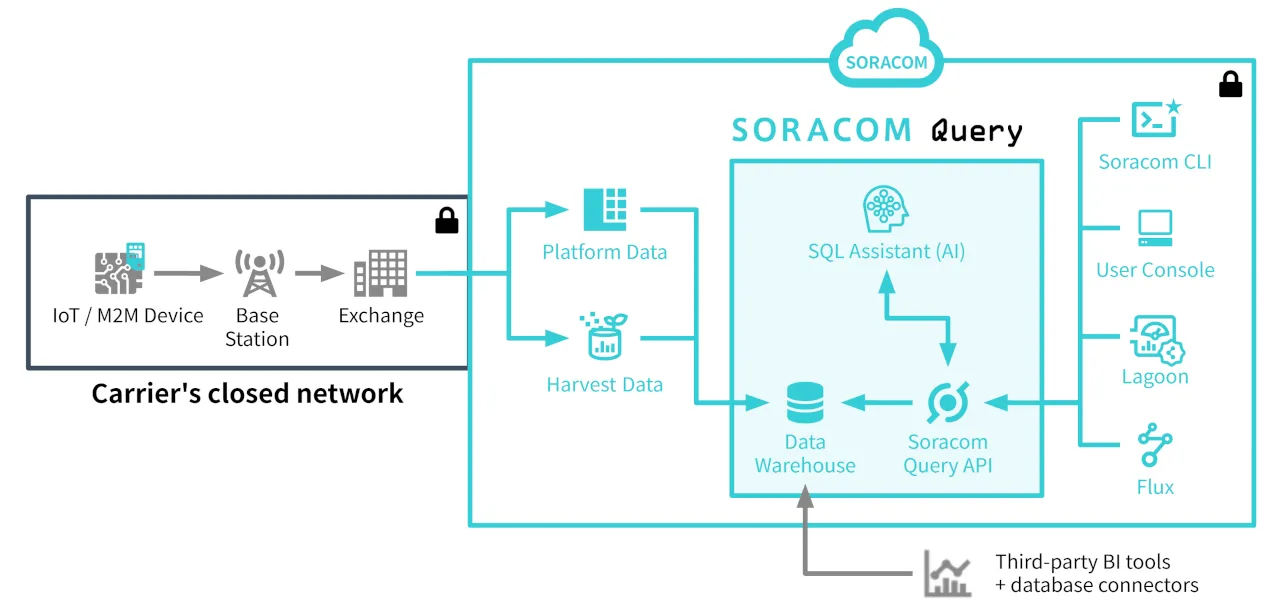
With its intuitive UI and AI-powered assistant, Soracom Query empowers everyone from data scientists to non-technical users to make data-driven decisions without writing a single line of SQL.
Visit the Plans page to discover the available plans and their features.
Use Cases
Soracom Query lets you turn your IoT data into insights. Whether you’re troubleshooting, optimizing, reporting, or building dashboards, you’ll have all the tools you need.
- Connectivity & usage analysis: Inspect IoT SIM behavior spot devices with unusual data usage or irregular connectivity and build fleet status reports.
- Sensor data trend analysis: Analyze time-series data stored in Harvest Data to detect anomalies and uncover patterns.
- Business reporting: Aggregate metrics like daily traffic by country or top 10 SIMs by usage, then export data to CSV for comparison and integration with other business metrics.
- BI integration: Feed analysis results into your BI dashboards for real-time visualization and automated reporting (available on Enterprise plan only).
Data Categories
Query can analyze the following data types:
| Category | Description |
|---|---|
| Billing | Monthly billing history, including amounts, currency, and detailed plan information. |
| Connectivity | Network connection details, including country, network, cell tower, connection history, and data usage. |
| User Data | Device data uploaded to Harvest Data time-series data (e.g.: temperature and humidity) and metadata of files uploaded Harvest Files (file lists, sizes, types). |