


Configuration
Enabling Endorse will incur fees based on the number of devices where the service is enabled. Refer to the Pricing & Fee Schedule for more information.
Soracom Endorse settings are found in Soracom Air for Cellular group settings.
-
Sign in to the User Console . From the Menu, open the Groups screen.
-
From the list of groups, click the Name of the group you want to configure to open its settings page.
You can also open the group settings page directly from the SIM Management screen. Simply find a SIM that currently belongs to the group you want to configure, then click the group name.
-
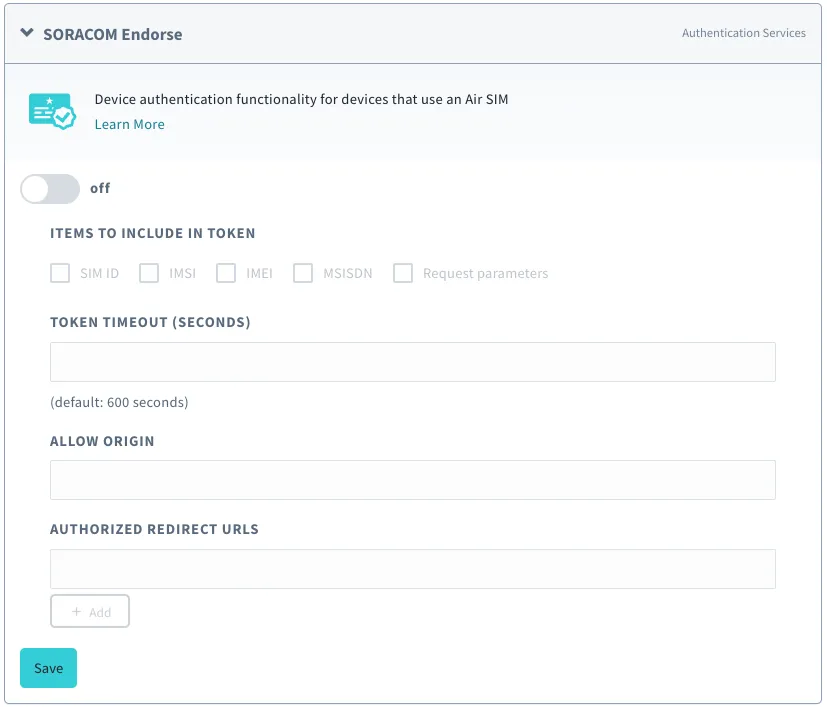
From the Basic Settings tab, click the SORACOM Endorse panel to expand its settings.
-
Enable Endorse by switching the option to ON.
-
Configure any of the Options below.
-
Click the Save button at the bottom of the panel.
Once Endorse has been enabled and configured, it will be immediately available to any Air for Cellular subscriber that belongs to the group.
Options
- Items to include in token - Adds the selected parameters to the token payload data.
- SIM ID - Adds the SIM ID to the token.
- IMSI - Adds the subscriber IMSI to the token.
- IMEI - Adds the device IMEI to the token.
- MSISDN - Adds the number of the subscriber to the token.
- Request parameters - Adds additional parameters passed from the HTTP token request. For example, by specifying a query string
?user=sorain the initial HTTP GET token request, the parameter"user": "sora"will be included in the token.
- Token timeout - The validity period in seconds of the token from time of issue.
- Allow origin - Adds an
Access-Control-Allow-Originheader to the HTTP response for CORS (Cross-Origin Resource Sharing). When accessing Endorse through an external resource (such as an AJAX request), you can specify the external origin to allow the request. - Authorized redirect URLs - A list of redirect URLs to allow when an HTTP
GETrequest includes aredirect_urlparameter in the query string (see Advanced Usage).
Advanced Configuration
Endorse can also be configured through the Soracom API or CLI by using the SoracomEndorse namespace.
Configuration Structure
"SoracomEndorse": {
  "enabled": true|false,
  "parametersToEndorse" {
    "simId": true|false,
    "imsi": true|false,
    "imei": true|false,
    "msisdn": true|false,
    "requestParameters": true|false
  },
  "tokenTimeoutSeconds": 600,
  "allowOrigin": "",
  "authorizedRedirectUrls": []
}
Parameters
Enable or disable Endorse:
- key (string, required) -
enabled - value - (boolean, default:
false) - Enables or disables Endorse.
Modify which parameters are included in Endorse tokens.
- key (string, required) -
parametersToEndorse - value (object, required) - Configure Endorse token parameters.
- simId (boolean, default
false) - Includes or excludes SIM ID from token parameters. - imsi (boolean, default
false) - Includes or excludes subscriber IMSI from token parameters. - imei (boolean, default
false) - Includes or excludes device IMEI from token parameters. - msisdn (boolean, default
false) - Includes or excludes subscriber MSISDN from token parameters. - requestParameters (boolean, default
false) - Includes or excludes query string parameters from token parameters.
- simId (boolean, default
Modify the token TTL:
- key (string, required) -
tokenTimeoutSeconds - value (integer, default:
600) - Length of time (in seconds) tokens will be valid from time of issue.
Modify URL for use in CORS headers:
- key (string, required) -
allowOrigin - value (string, required) - The URL to set in the
Access-Control-Allow-Originresponse. When blank, CORS headers are disabled.
Modify URLs that are authorized for redirection from Endorse:
- key (string, required) -
authorizedRedirectUrls - value (array of strings, required) - Array of URLs where redirection is authorized. Used in conjunction with a
redirect_urlquery parameter.
Sample
[
  {
    "key": "enabled",
    "value": true
  },
  {
    "key":"parametersToEndorse",
    "value": {
      "simId": true,
      "imsi": true,
      "imei": true,
      "msisdn": false,
      "requestParameters": true
    }
  },
  {
    "key": "tokenTimeoutSeconds",
    "value": 600
  },
  {
    "key": "allowOrigin",
    "value": "https://soracom.io"
  },
  {
    "key": "authorizedRedirectUrls",
    "value": ["https://soracom.io", "http://localhost:3000"]
  }
]