


Configuration
Enabling Funnel will incur fees based on the number of requests made. Refer to the Pricing & Fee Schedule for more information.
Soracom Funnel settings are found in Soracom Air or Soracom Inventory group settings.
Funnel settings are shared among all device types within the same group. This means that you can configure Funnel for one device type (cellular, Sigfox, LoRaWAN, or Inventory), and all other device types within that group will also use the same Funnel settings.
If you want to use different Funnel settings for different device types, simply create multiple groups each with different Funnel settings, and assign your devices accordingly.
To configure Funnel, open the settings page of the group that you want to configure.
Underneath the Basic Settings tab, click the Soracom Funnel panel to expand its settings.
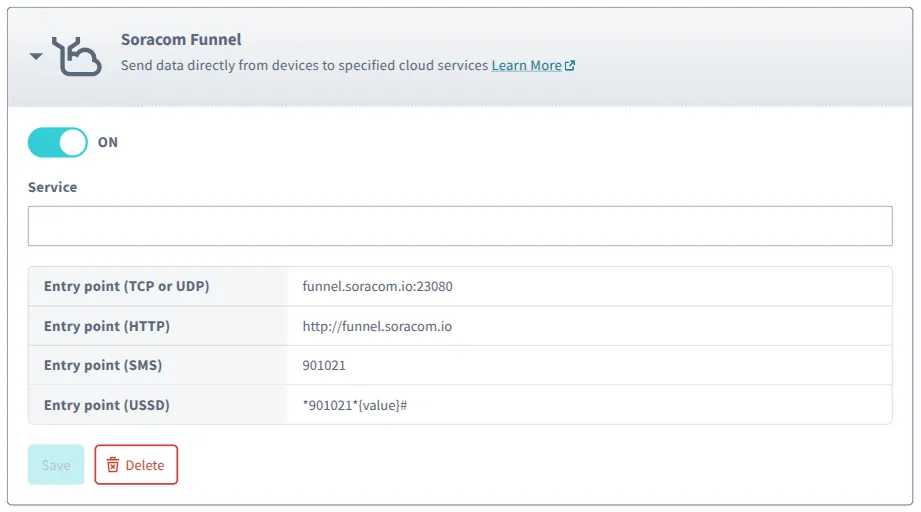
Enable Funnel by switching the option to ON.
You can then select the Service that you would like Funnel to forward data to, and provide configuration parameters for the service.
Funnel uses TLS 1.2. Ensure to configure your cloud service to support TLS 1.2.
Parameters
- Service - The cloud service provider where Funnel will send data. Possible options are:
- Amazon Kinesis Data Streams
- Amazon Data Firehose
- AWS IoT
- Microsoft Azure Event Hubs
- Google Cloud Pub/Sub
- Destination or Topic - The forwarding destination or topic name, as configured in your cloud service.
- Credential set - The authentication credentials to use to connect to your cloud service.
- Content type - The format of data being sent by your device.
- For detailed behavior of each option, including (not specified), refer to Data Format.
The Soracom Binary Format v1 content type is only available over TCP.
If you select Soracom Binary Format v1 as the Content type for Funnel and also enable Receive data in Soracom Binary Format v1 for the Unified Endpoint, the Content type of Funnel will behave the same as when (not specified) is selected. Therefore, even if you send data to Funnel's TCP entry point, it will not be processed as compliant with Soracom Binary Format v1.
To see the processing order when using Binary Parser or Orbit together, refer to Processing Order of Data Sent to Soracom Entry Points.
When selecting the Amazon Kinesis Data Streams service, you can additionally set:
- Randomize partition key - Use a random value instead of IMSI or device ID in the partition key.
Advanced Configuration
Funnel can also be configured through the Soracom API or CLI by using the SoracomFunnel namespace.
Configuration Structure
"SoracomFunnel": {
  "enabled": true|false,
  "destination": {
    "provider": "aws"|"azure"|"google",
    "service": "aws-iot"|"kinesis"|"firehose"|"eventhubs"|"pubsub",
    "resourceUrl": "https://example.com/path/to/resource"
  },
  "credentialsId": "my-credentials",
  "contentType": ""|"json"|"text"|"binary"
}
Parameters
Enable or disable Funnel:
- key (string, required) -
enabled - value (boolean, default:
false) - Enables or disables Funnel.
Modify the Funnel destination:
- key (string, required) -
destination - value (object, required) - Destination configuration.
- provider (string, required) - Select the destination provider. Valid options:
"aws","azure", and"google". - service (string, required) - Select the destination service. The service must correspond to the provider. Valid options:
"aws-iot","kinesis","firehose","eventhubs", or"pubsub". - resourceUrl (string, required) - The destination endpoint or resource URL.
- provider (string, required) - Select the destination provider. Valid options:
Modify credentials to use for authentication:
- key (string, required) -
credentialsId - value (string, required) - Name of credentials stored on Soracom to use for authentication with Funnel destination.
Modify data processing behavior:
- key (string, required) -
contentType - value (string, default:
"") - Specifies processing to be applied to user data contained in payloads. Valid options:""(not specified),"json","text", or"binary".- For detailed behavior of each
contentTypeoption, refer to Data Format.
- For detailed behavior of each
Content type - Soracom Binary Format v1 is only available with TCP
If you select Soracom Binary Format v1 as the contentType for Funnel and also enable useSoracomBinaryFormat for the Unified Endpoint, the contentType of Funnel will behave the same as the default value. Therefore, even if you send data to Funnel's TCP entry point, it will not be processed as compliant with Soracom Binary Format v1.
To see the processing order when using Binary Parser or Orbit together, refer to Processing Order of Data Sent to Soracom Entry Points.
Sample Configuration
[
  {
    "key": "enabled",
    "value": true
  },
  {
    "key": "destination",
    "value": {
      "provider": "aws",
      "service": "kinesis",
      "resourceUrl": "https://kinesis.ap-northeast-1.amazonaws.com/my-kinesis-stream"
    }
  },
  {
    "key": "credentialsId",
    "value": "my-credentials"
  },
  {
    "key": "contentType",
    "value": "json"
  }
]