


Configuration
Enabling Orbit will incur fees based on the number of devices that use Orbit, and the number of requests made. Refer to the Pricing & Fee Schedule for more information.
Soracom Orbit settings are found in Soracom Air for Cellular group settings.
To configure Orbit, open the settings page of the group that you want to configure.
Underneath the Basic Settings tab, click the SORACOM Orbit panel to expand its settings.
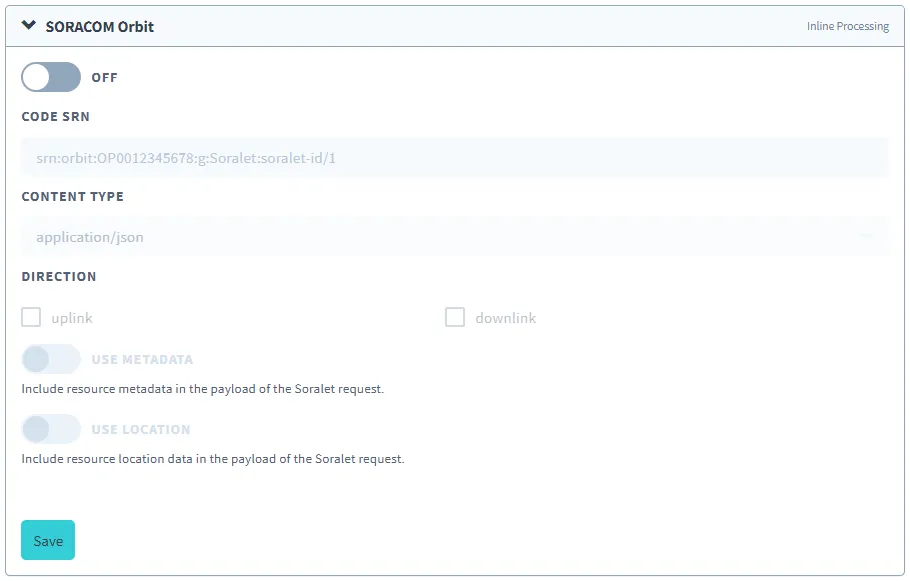
Enable Orbit by switching the option to ON.
You can then set the configuration parameters for the service.
Parameters
- Code SRN - The Soracom Resource Name of the Soralet to use, including module version.
- Content Type - The type of data sent from your device.
- Direction - Enable or disable data processing based on the data flow direction:
uplink- Process data sent from your device to a serverdownlink- Process responses sent from a server back to your device
- Use Metadata - Allow Orbit to access the Metadata Service, if your module requires subscriber data (such as tags or userdata). The Metadata Service option must also be enabled.
- Use Location - Allow Orbit to access the Simple Location Service, if your module requires subscriber position data. The Simple Location Service option must also be enabled (only available for KM1 SIMs).
Advanced Configuration
Orbit can also be configured through the Soracom API or CLI by using the SoracomOrbit namespace.
Configuration Structure
"SoracomOrbit": {
  "enabled": true|false,
  "codeSrn": "srn:soracom:OP0012345678:g:Soralet:my-soralet/1",
  "contentType": "text/plain"|"application/json"|"application/octet-stream",
  "direction": [
    "uplink",
    "downlink"
  ],
  "useMetadata": true|false,
  "useLocation": true|false
}
Parameters
Enable or disable Orbit:
- key (string, required) -
enabled - value (boolean, default:
false) - Enables or disables Orbit.
Modify the Soracom Resource Name (SRN) of the Soralet to use, including module version:
- key (string, required) -
codeSrn - value (string, required) - The SRN of the Soralet.
Modify the data processing behavior:
- key (string, required) -
contentType - value (string, default:
"application/json") - Specifies processing to be applied to data contained in payloads. Valid options:"text/plain","application/json", or"application/octet-stream". When set to JSON, data will be parsed as JSON.
Modify the data processing direction:
- key (string, required) -
codeSrn - value (array of strings, required) - The direction(s) where Orbit will apply data processing. Valid options:
"uplink"- Process data sent from your device to a server"downlink"- Process responses sent from a server back to your device
Enable or disable Metadata Service access:
- key (string, required) -
useMetadata - value (boolean, default:
false) - Allow or disallow Orbit to access Metadata Service.
Enable or disable Simple Location Service access:
- key (string, required) -
useLocation - value (boolean, default:
false) - Allow or disallow Orbit to access Simple Location Service.
Sample Configuration
[
  {
    "key": "enabled",
    "value": true
  },
  {
    "key": "codeSrn",
    "value": "srn:soracom:OP0012345678:g:Soralet:my-soralet/1"
  },
  {
    "key": "contentType",
    "value": "application/json"
  },
  {
    "key": "direction",
    "value": [
      "uplink",
      "downlink"
    ]
  },
  {
    "key": "useLocation",
    "value": true
  },
  {
    "key": "useMetadata",
    "value": true
  }
]