


Configuration
Unified Endpoint settings are found in Soracom Air or Soracom Inventory group settings.
Unified Endpoint is already enabled for all groups and does not require any configuration for use. Instead, the group should be configured to use Soracom Beam, Funnel, Funk, or Harvest Data according to which services you want to use.
- Soracom Beam Configuration
- Soracom Funnel Configuration
- Soracom Funk Configuration
- Soracom Harvest Configuration
Once Beam, Funnel, Funk, or Harvest Data settings are enabled, your device should be configured to use an appropriate Unified Endpoint entry point.
Unified Endpoint does not support Harvest Files. Unified Endpoint routes data only to Harvest Data; file uploads to Harvest Files must use the Harvest Files entry point.
Refer to the Limitations section for more information on Unified Endpoint limitations.
Response Format
As Soracom Beam, Funnel, Funk, and Harvest Data will return response messages to the device in various formats depending on entry point and forwarding destination protocol or service, you can configure how Unified Endpoint should handle each of those responses by configuring Unified Endpoint's Format option.
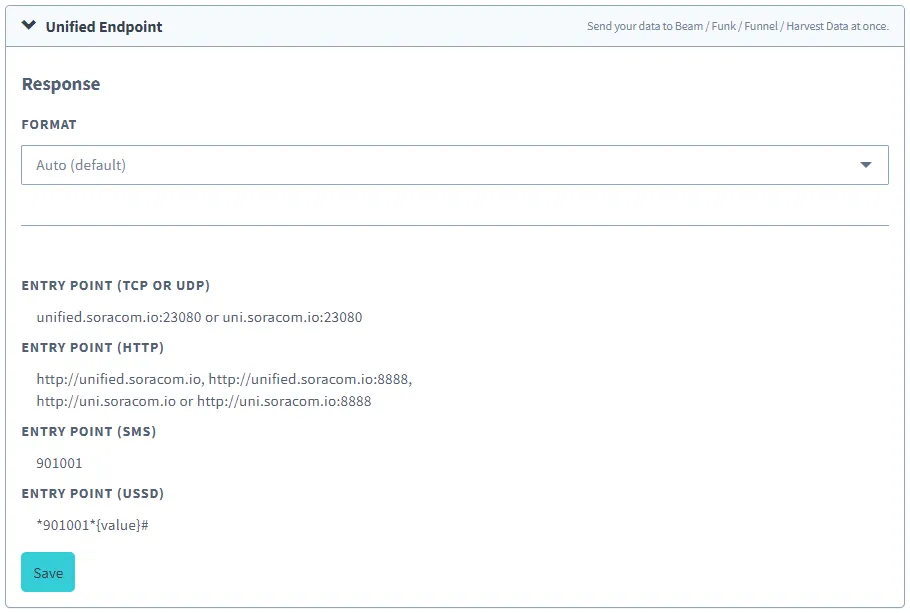
Refer to the Response Format documentation for more information.
TCP Entry Point Settings
Receive data in Soracom Binary Format v1 allows you to configure whether binary data sent via TCP from a device should be processed as compliant with Soracom Binary Format v1.
To see the processing order when using Binary Parser or Orbit together, refer to Processing Order of Data Sent to Soracom Entry Points.