


Overview
Soracom Harvest is a service for collecting, visualizing, and storing data and files from Soracom Air and Soracom Inventory devices. Harvest provides data storage for your devices, and generates charts from numerical data that can be accessed directly from the User Console.
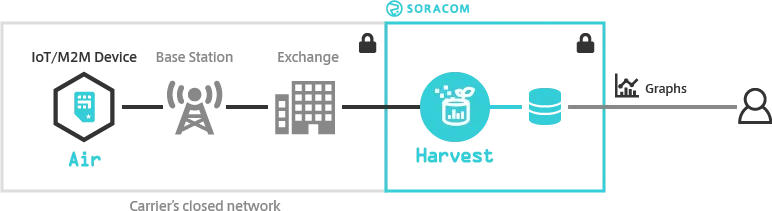
Soracom Harvest also supports file upload and storage! Refer to the File Entry Points section below, as well as the Configuration and File Operations sections.
Data Entry Points
To send data to Harvest Data, simply configure your device to send data to one of the following entry points:
Air for Cellular
| Entry Point | Address |
|---|---|
| HTTP | http://harvest.soracom.io |
| TCP | tcp://harvest.soracom.io:8514 |
| UDP | udp://harvest.soracom.io:8514 |
| SMS | 901031 |
| USSD | *901031*{value}# |
Air for Sigfox and Air for LoRaWAN
Data is captured automatically from the device. Configuring the device to send data to a specific entry point is not required.
Soracom Inventory
| Entry Point | Address |
|---|---|
| HTTP | https://api.soracom.io/v1/devices/{DEVICE-ID}/publish?device_secret={DEVICE-KEY-SECRET} |
File Entry Points
To upload files to Harvest Files, simply configure your device to send file data to the following entry point:
Air for Cellular
| Entry Point | Address |
|---|---|
| HTTP | http://harvest-files.soracom.io |
You can also download files from the same endpoint.
Uploading or downloading files using other protocols, or using Air for Sigfox, Air for LoRaWAN, or Soracom Inventory devices, is not supported.
Chart Types
Harvest Data automatically generates line, bar, and stacked bar charts for numerical data, as well as map charts for geographical location data.
When sending numerical data to Harvest using JSON format, Harvest will automatically plot each key in the JSON object as a separate series, using the time that each data point was received as the X-axis value, and the numerical value as the Y-axis value.
To generate map charts, your JSON data should include lat latitude and lng longitude keys.
Encryption
Harvest does not provide any encryption for received data or files. If you require encryption, ensure that your data is encrypted before sending it to Harvest. Note that when data is encrypted, charts will not be generated.
Retention
By default, Harvest Data provides data storage for up to 40 days. An Extended Data Retention option is available, that extends this period to two years (731 days).
When uploading files to Harvest Files, each file is stored for 731 days and then automatically deleted. Harvest Files does not provide additional storage terms for files.
Limitations
When sending data to Harvest Data, the following limitations apply:
- Each Harvest request is limited to a maximum data size of 1 KB (1,024 bytes).
- Data will be stored for 40 days by default. For additional data retention, use the Harvest Extended Data Retention option. Data that has passed the retention period cannot be recovered.
- Sending data to Harvest using SMS or USSD is only supported by 01s, 01s-ldv, and US SIMs, as well as X1, X2, and X3 Subscription Containers.
- When sending data to Harvest using SMS, ensure that your device's SMS header option is disabled. If a header is included, the SMS User Data field will be processed as-is and will result in unwanted or malformed text content.
When uploading files to Harvest Files, the following limitations apply:
- Each file is limited to a maximum size of 5 GB (5,120 MB).
- Each file path (including filename) is limited to 1,024 Bytes in length.
- Each file path is also limited to a maximum of 16 directory levels.
- If a file already exists at the specified file path, the existing file will be overwritten.
- Uploading files using TCP or UDP is not supported.
All file types can be uploaded to Harvest. There are no restrictions.
Maintenance
Sessions may be disconnected during system maintenance.
During Soracom maintenance, HTTP/MQTT/TCP/UDP sessions may be disconnected at any time. Note that session disconnections due to maintenance will not be announced on Soracom Status Dashboard .
Free Tier
Soracom provides a free tier for Harvest Data with each Soracom account. Refer to the Pricing & Fee Schedule for more information.