


Event + Heartbeat Mode
The Event + Heartbeat mode sends a message each time the built-in button is clicked or the external I/O is triggered, and also sends an additional message at regular intervals indicating that the button is still able to connect.
Configuration
To configure your button for Event + Heartbeat mode:
-
Follow the Configuration instructions for configuring Soracom LTE-M Button settings.
-
Select the Timer mode option:
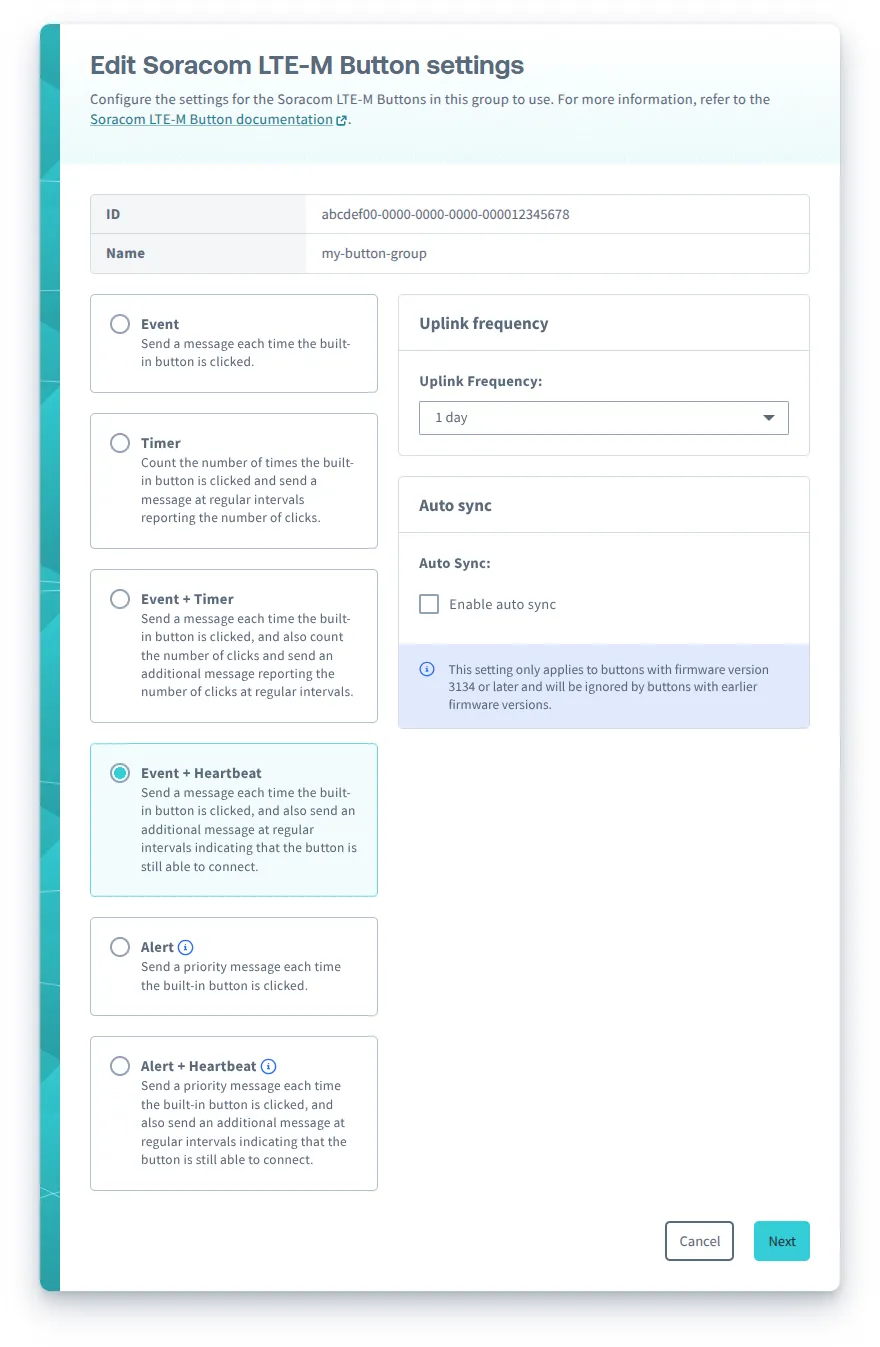
You can configure the following options for Event + Heartbeat mode:
- Uplink frequency - The frequency to send Heartbeat messages.
- Auto sync - For buttons with firmware version 3134 or later, automatically sync once a day.
- External I/O mode - Configure the external I/O accessory port:
- Enable debounce - Enables debouncing for Edge Detection and Pulse Detection external I/O modes to reduce false triggers.
After configuring Soracom LTE-M Button settings, follow the instructions to sync your button.
Messages
When the Soracom LTE-M Button operation mode is configured as Event + Heartbeat, the button will send the following types of messages:
- Event message (when the external I/O mode is configured as Edge Detection, Pulse Detection, or disabled), indicating the type of event that triggered the message
- Event with Temperature message (when the external I/O mode is configured as Temperature Sensor), indicating the type of event that triggered the message and reporting the measured temperature
- Heartbeat message, reporting the current status of the button
- Status message, reporting the current status and configuration of the button
Behavior
Firmware 3134:
| Input | Action | External I/O mode | |||
|---|---|---|---|---|---|
| Disabled | [Edge Detection](../edge-detection) | [Pulse Detection](../pulse-detection) | [Temperature Sensor](../temperature-sensor) | ||
| Built-in button | Single short click*1 | - LED blinks one short green blink: .\n- Sends an **Event message** with detect type `Single short click` | - LED blinks one short green blink: .\n- Sends an **Event with Temperature message** with detect type `Single short click` | ||
| Double short click | - LED blinks two short green blinks: . .\n- Sends an **Event message** with detect type `Double short click` | - LED blinks two short green blinks: . .\n- Sends an **Event with Temperature message** with detect type `Double short click` | |||
| Single long click | - LED blinks one long green blink: .---\n- Sends an **Event message** with detect type `Single long click` | - LED blinks one long green blink: .---\n- Sends an **Event with Temperature message** with detect type `Single long click` | |||
| Extra long click | - LED blinks three short green blinks: . . .\n- Sends a **Status message** to report the current status and configuration | ||||
| 2-wire accessory | Connected | - LED blinks one short green blink: .\n- Sends an **Event message** with detect type `Falling edge` | - Starts a timer and waits for the wire to disconnect | ||
| Disconnected | - LED blinks one short green blink: .\n- Sends an **Event message** with detect type `Rising edge` | - Calculates the timer and performs the same action as the built-in button | |||
| Internal timer | Uplink frequency*2 | - Sends a **Heartbeat** message to report the current status | |||
| Every 24 hours | - If Auto sync is enabled, sends a **Status message** to report the current status and configuration | ||||
*1 - If the button is connecting to the network in order to send a message, a Single short click will cancel the message (does not apply to the Heartbeat message).
*2 - The Uplink frequency is specified when configuring the operation mode as Event + Heartbeat.
Firmware 2220:
| Input | Action | External I/O mode | |||
|---|---|---|---|---|---|
| Disabled | [Edge Detection](../edge-detection) | [Pulse Detection](../pulse-detection) | [Temperature Sensor](../temperature-sensor) | ||
| Built-in button | Single short click*1 | - LED blinks one short green blink: .\n- Sends an **Event message** with detect type `Single short click` | - LED blinks one short green blink: .\n- Sends an **Event with Temperature message** with detect type `Single short click` | ||
| Double short click | - LED blinks one short green blink: .\n- Sends an **Event message** with detect type `Double short click` | - LED blinks one short green blink: .\n- Sends an **Event with Temperature message** with detect type `Double short click` | |||
| Single long click | - LED blinks one short green blink: .\n- Sends an **Event message** with detect type `Single long click` | - LED blinks one short green blink: .\n- Sends an **Event with Temperature message** with detect type `Single long click` | |||
| Extra long click | - LED blinks one short green blink: .\n- Sends a **Status message** to report the current status and configuration | ||||
| 2-wire accessory | Connected | - LED blinks one short green blink: .\n- Sends an **Event message** with detect type `Falling edge` | - Starts a timer and waits for the wire to disconnect | ||
| Disconnected | - LED blinks one short green blink: .\n- Sends an **Event message** with detect type `Rising edge` | - Calculates the timer and performs the same action as the built-in button | |||
| Internal timer | Uplink frequency*2 | - Sends a **Heartbeat** message to report the current status | |||
*1 - If the button is connecting to the network in order to send a message, a Single short click will cancel the message (does not apply to the Heartbeat message).
*2 - The Uplink frequency is specified when configuring the operation mode as Event + Heartbeat.
LED Indicator
While the button is sending an Event message, Event with Temperature message, Heartbeat message, or Status message, the LED will blink to indicate the progress:
| LED blink pattern | Description | Progress | ---|--- | .-- .-- .-- (repeating) | Slow green blinking | The button is connecting to a network | | . . . . (repeating) | Fast green blinking | The button has connected and is sending the message | | .-------- | Extra long green blink | The button successfully sent the message | | .-------- | Extra long red blink | An error occurred |
If the button has trouble sending a message, it will try one more time before giving up. For more information, refer to the Troubleshooting section.
Refer to the LED Reference for descriptions of additional indicators.
Canceling a Message
If you want to cancel an Event message, Event with Temperature message, or Status message, simply click the built-in button once while the button is connecting to a network.
The Heartbeat message cannot be canceled.