


Timer Mode
The Timer mode counts the number of built-in button clicks or external I/O triggers and sends a message at regular intervals reporting the number of clicks and triggers detected during that interval.
Configuration
To configure your button for Timer mode:
-
Follow the Configuration instructions for configuring Soracom LTE-M Button settings.
-
Select the Timer mode option:
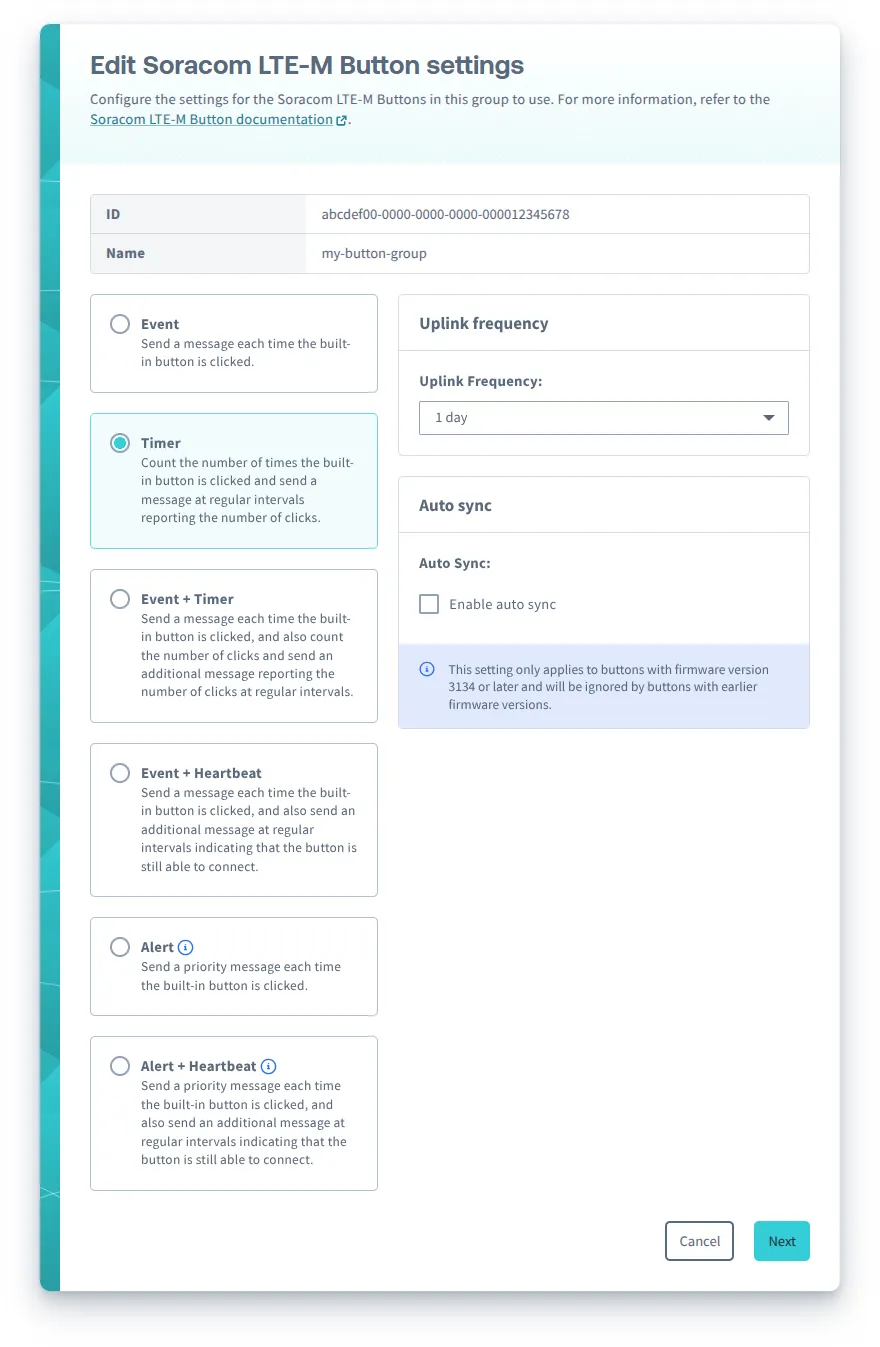
You can configure the following options for Timer mode:
- Uplink frequency - The frequency to send Timer messages.
- Auto sync - For buttons with firmware version 3134 or later, automatically sync once a day.
- External I/O mode - Configure the external I/O accessory port:
- Enable debounce - Enables debouncing for Edge Detection and Pulse Detection external I/O modes to reduce false triggers.
After configuring Soracom LTE-M Button settings, follow the instructions to sync your button.
Messages
When the Soracom LTE-M Button operation mode is configured as Timer, the button will send the following types of messages:
- Timer message, reporting the number of built-in button clicks and external I/O triggers detected during the configured interval
- Status message, reporting the current status and configuration of the button
Timer and Summary Intervals
Timer messages are sent at regular intervals according to the configured Uplink frequency.
To provide additional granularity, each Timer message is subdivided into 5 summaries, with the duration of each summary equal to 1/5th the duration of the Uplink frequency:

For example:
- If the Uplink frequency is 1 day (24 hours), each summary will be 4 hours and 48 minutes in duration
- If the Uplink frequency is 1 hour, each summary will be 12 minutes in duration
Each summary is labeled with a number from 1–5.
Detected Events
The Timer message will consist of the following summaries, reporting the detected events:
- short_summary_# - The number of single short clicks detected from the built-in button during the summary interval
- double_summary_# - The number of double short clicks detected from the built-in button during the summary interval
- long_summary_# - The number of single long clicks detected from the built-in button during the summary interval
- edge_summary_# - The number of connections and disconnections detected from an external button or switch connected via the 2-wire accessory during the summary interval, when the external I/O mode is configured as Edge Detection
- temp_summary_# - The temperature measured from an attached temperature sensor at the end of the summary interval, when the external I/O mode is configured as Temperature Sensor
If the external I/O mode is configured as Pulse Detection, events triggered from an external button or switch will also be counted in the short_summary_#, double_summary_#, and long_summary_# sumamries.
Behavior
Firmware 3134:
| Input | Action | External I/O mode | |||
|---|---|---|---|---|---|
| Disabled | [Edge Detection](../edge-detection) | [Pulse Detection](../pulse-detection) | [Temperature Sensor](../temperature-sensor) | ||
| Built-in button | Single short click | - LED blinks one short green blink: .\n- Increments the **short\_summary\__#_** counter | |||
| Double short click | - LED blinks two short green blinks: . .\n- Increments the **double\_summary\__#_** counter | ||||
| Single long click | - LED blinks one long green blink: .---\n- Increments the **long\_summary\__#_** counter | ||||
| Extra long click | - LED blinks three short green blinks: . . .\n- Sends a **Status message** to report the current status and configuration | ||||
| 2-wire accessory | Connected | - LED blinks one short green blink: .\n- Increments the **edge\_summary\__#_** counter | - Starts a timer and waits for the wire to disconnect | ||
| Disconnected | - LED blinks one short green blink: .\n- Increments the **edge\_summary\__#_** counter | - Calculates the timer and performs the same action as the built-in button | |||
| Internal timer | Uplink frequency | - Sends a **Timer message** | - Reads the temperature sensor*1\n- Sends a **Timer message** | ||
| Every 24 hours | - If Auto sync is enabled, sends a **Status message** to report the current status and configuration | ||||
*1 - The temperature sensor is measured at the end of each summary interval.
Firmware 2220:
| Input | Action | External I/O mode | |||
|---|---|---|---|---|---|
| Disabled | [Edge Detection](../edge-detection) | [Pulse Detection](../pulse-detection) | [Temperature Sensor](../temperature-sensor) | ||
| Built-in button | Single short click | - Increments the **short\_summary\__#_** counter | |||
| Double short click | - Increments the **double\_summary\__#_** counter | ||||
| Single long click | - Increments the **long\_summary\__#_** counter | ||||
| Extra long click | - LED blinks one short green blink: .\n- Sends a **Status message** to report the current status and configuration | ||||
| 2-wire accessory | Connected | - Increments the **edge\_summary\__#_** counter | - Starts a timer and waits for the wire to disconnect | ||
| Disconnected | - Increments the **edge\_summary\__#_** counter | - Calculates the timer and performs the same action as the built-in button | |||
| Internal timer | Uplink frequency | - Sends a **Timer message** | - Reads the temperature sensor*1\n- Sends a **Timer message** | ||
*1 - The temperature sensor is measured at the end of each summary interval.
LED Indicator
While the button is sending an Timer message or Status message, the LED will blink to indicate the progress:
| LED blink pattern | Description | Progress | ---|--- | .-- .-- .-- (repeating) | Slow green blinking | The button is connecting to a network | | . . . . (repeating) | Fast green blinking | The button has connected and is sending the message | | .-------- | Extra long green blink | The button successfully sent the message | | .-------- | Extra long red blink | An error occurred |
If the button has trouble sending a message, it will try one more time before giving up. For more information, refer to the Troubleshooting section.
Refer to the LED Reference for descriptions of additional indicators.
Canceling a Message
If you want to cancel a Status message, simply click the built-in button once while the button is connecting to a network.
The Timer message cannot be canceled.