


API/Manual Execution Event Source
When you select API/Manual Execution as the Event Source for the Flux App, the App is triggered when the API endpoint receives a request.
Sending Data to a Channel
With the API/Manual Execution event source, you can send data over the Soracom API to your Flux App channel. For more information on sending a request to the Soracom API, refer to the Soracom API Usage Guide.
Locating the Channel API Endpoint URL
The API endpoint can be found under the Event Source tab of the channel.
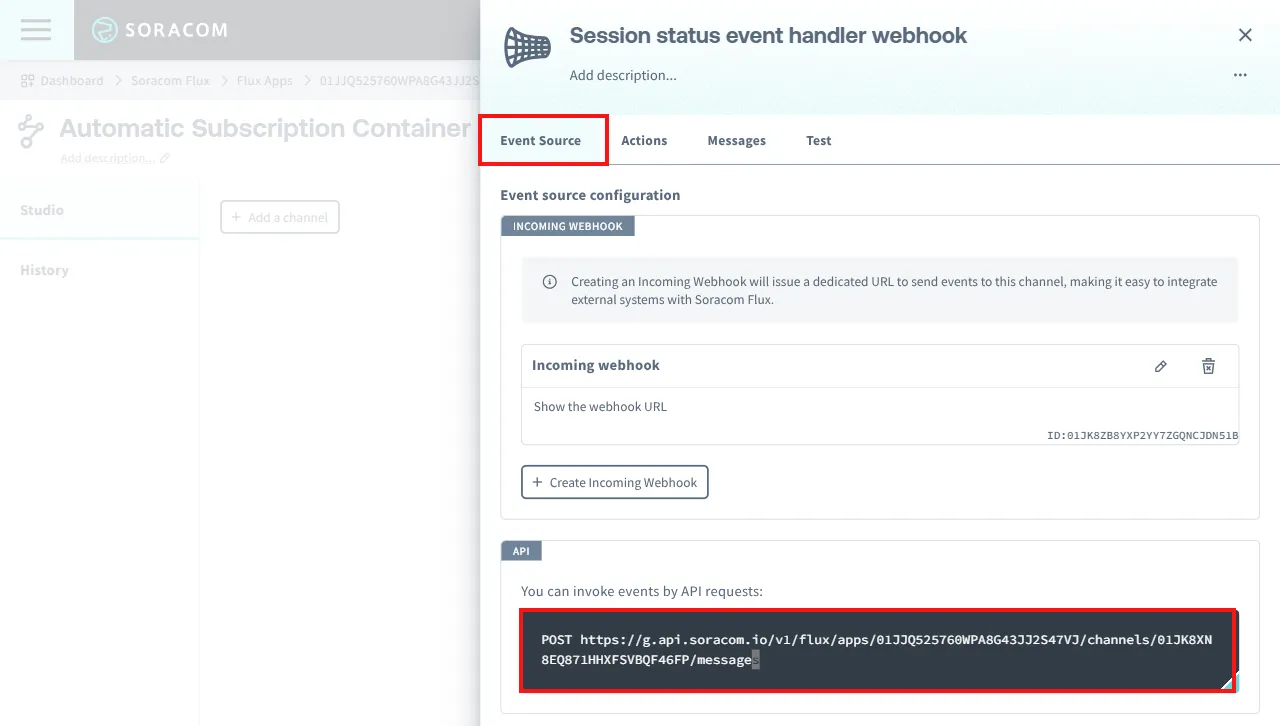
Here is the format of the API endpoint URL:
https://g.api.soracom.io/v1/flux/apps/{app_id}/channels/{channel_id}/messagesThis includes the following variables:
| Variable | Description |
|---|---|
app_id | Replace with the ID of the Flux App. |
channel_id | Replace with the ID of the channel. |
g.api.soracom.iois the domain for Global coverage. Useapi.soracom.iofor Japan coverage. For more details, refer to the Soracom API Usage Guide.
Sending an Example Request
Below you can find an example of sending {"temperature": 25} to the API endpoint of a channel:
curl -X POST "https://g.api.soracom.io/v1/flux/apps/01ABCDEFGHIJKLMNOPQRSTU/channels/01VWXYZABCDEFGHIJKLM/messages" \
  -H "X-Soracom-API-Key: $X_Soracom_API_KEY" \
  -H "X-Soracom-Token: $X_Soracom_TOKEN" \
  -H "Content-Type: application/json" \
  -d '{"temperature": 25}'
To reference the event source's Message in an action, you can use
${event.payload.<MESSAGE_ATTRIBUTE>}orevent.payload.<MESSAGE_ATTRIBUTE> == 1.
Limitations of the API/Manual Execution Event Source:
The maximum payload that can be sent on a channel is 32,768 bytes;. Payloads exceeding this limit cannot be sent.
Data Format
The data sent to a channel configured with the API/Manual Execution event source consists of Message and Context.
You can check the data received by the event to the Flux App in the History tab of Soracom Flux Studio. For more details, refer to View Logs.
Message
For this event source, the message is the data sent to the API endpoint. Here's an example:
{
  "temperature": 25
}
Context
This contains the information about the event source.
{
  "eventType": "api"
}
The attributes are as follows:
| Attribute | Description |
|---|---|
eventType | The type of event. When the data sent via the API triggers the Flux App, the value is api. |