


Usage Status
You can check the usage status of Soracom Flux from the Flux Apps page.
Checking Usage Status
-
Sign in to the User Console and select the appropriate coverage type where you want to check usage.
If you are using Global coverage, ensure you have selected Global coverage before changing plans using Coverage Type selector.
-
From the Menu, expand Soracom Flux and select Flux Apps.
Your Flux usage information is displayed:
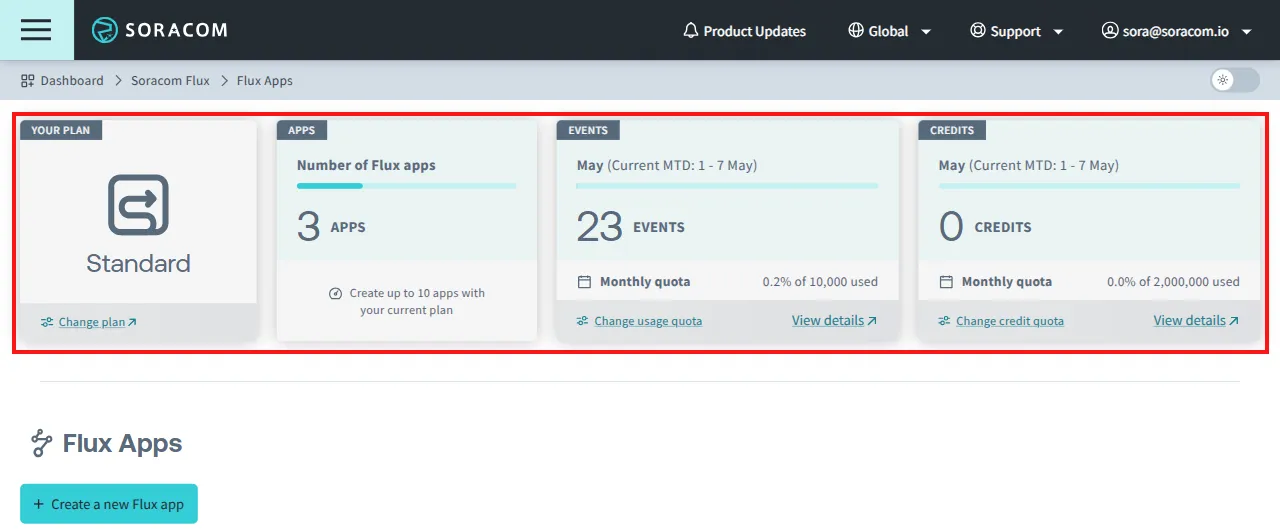
Item Description Your Plan Displays your current Soracom Flux plan. See Plans for more information.
If you have downgraded your plan, both the current month's plan and next month's plan are displayed.Apps Displays the number of saved Flux apps. Events Displays the total number of Flux events for the current month.*1 Credits Displays the total number of Flux credits consumed this month.*1 *1 Click View details on panel to see more detailed information on usage.
Usage Calculation
- To view credit consumption and event counts, see View Flux Usage.
- The Apps, Events, and Credits panels display the number of Flux apps, number of events this month, and credit usage this month, reflecting total usage under the same coverage type.
- The number of Flux Apps you can create, the bundled event count, and the bundled credit usage vary depending on your Flux plan. See Plans for details.
Tracking Event Count
A Flux event is counted when data is sent to a channel via an event source or an Incoming Webhook, triggering a Flux app's execution.
Credit Consumption
Certain Flux actions will consume Flux credits upon use.
AI actions, for instance, consume credits per request if the AI model being used incurs a cost.
For example:
Amazon Bedrock - Anthropic Claude 3 Haiku consumes 10 credits per request. Similarly, Azure OpenAI (GPT-4o) consumes 86 credits per request.
Reaching Credit Quotas
If you reach your Flux credit quota, actions that consume credits will no longer be available.
For AI actions, you can continue execution by using an OpenAI API key with AI models that do not consume credits.
If you want to change your quota see Changing Quotas for details. For pricing information on Flux credits, see the Pricing & Fee Schedule.