


Local Info Report
Local Info Report is a feature that allows you to retrieve information directly from the SIM and the device it is installed in by using a Java applet that is embedded in 01s, 01s-ldv, US, P1, X3, and X3-EU SIMs. Unlike basic network-provided SIM details that are available in the User Console or through the Soracom API or CLI, this feature can retrieve information about the SIM and device status, such as: ICCID, IMSI, MSISDN, IMEI, Location, and Battery level values (if supported by your device).
Requirements
In order to use Local Info Report, your IoT SIM must be:
- A 01s, 01s-ldv, US, P1, X3, or X3-EU IoT SIM
- Installed in a device that supports BIP (Bearer Independent Protocol)
- Located in a region where cellular coverage is available
Local Info Report cannot be used with eSIM Profiles.
Requesting a Report
Local Info Report requests are sent to the device via SMS. Each request incurs an MT SMS fee. For pricing details, refer to the Pricing & Fee Schedule.
If the SMS delivery fails, Soracom will automatically retry delivery. Automatic retries do not incur additional fees. For more information, refer to SMS Failure.
Information about base stations (Cell ID, Area Code, MCC, MNC, Radio Type) may not be available depending on the subscription, line in use, and other circumstances.
-
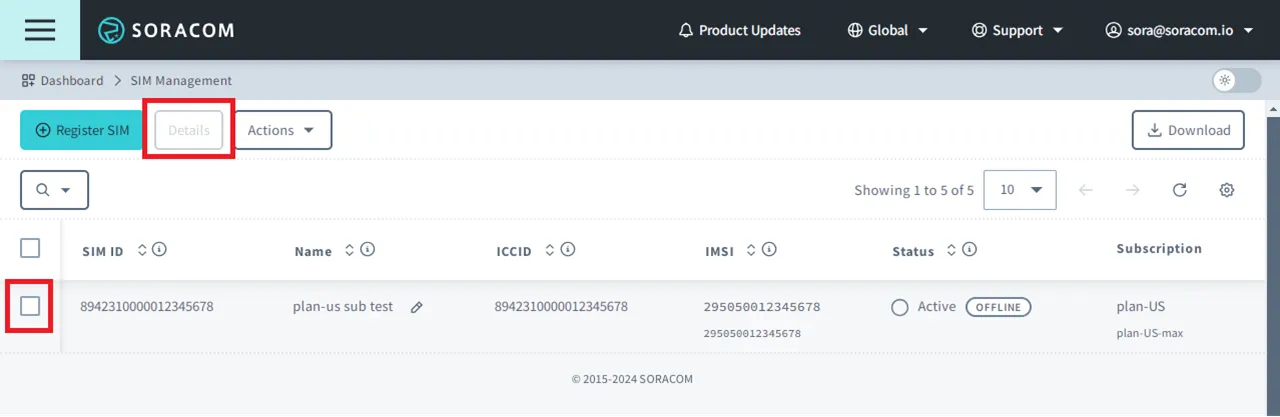
Sign in to the User Console . From the Menu, open the SIM Management screen.
-
From the list of subscribers, click the ✓ for the SIM you want to view, then click the Details button.
-
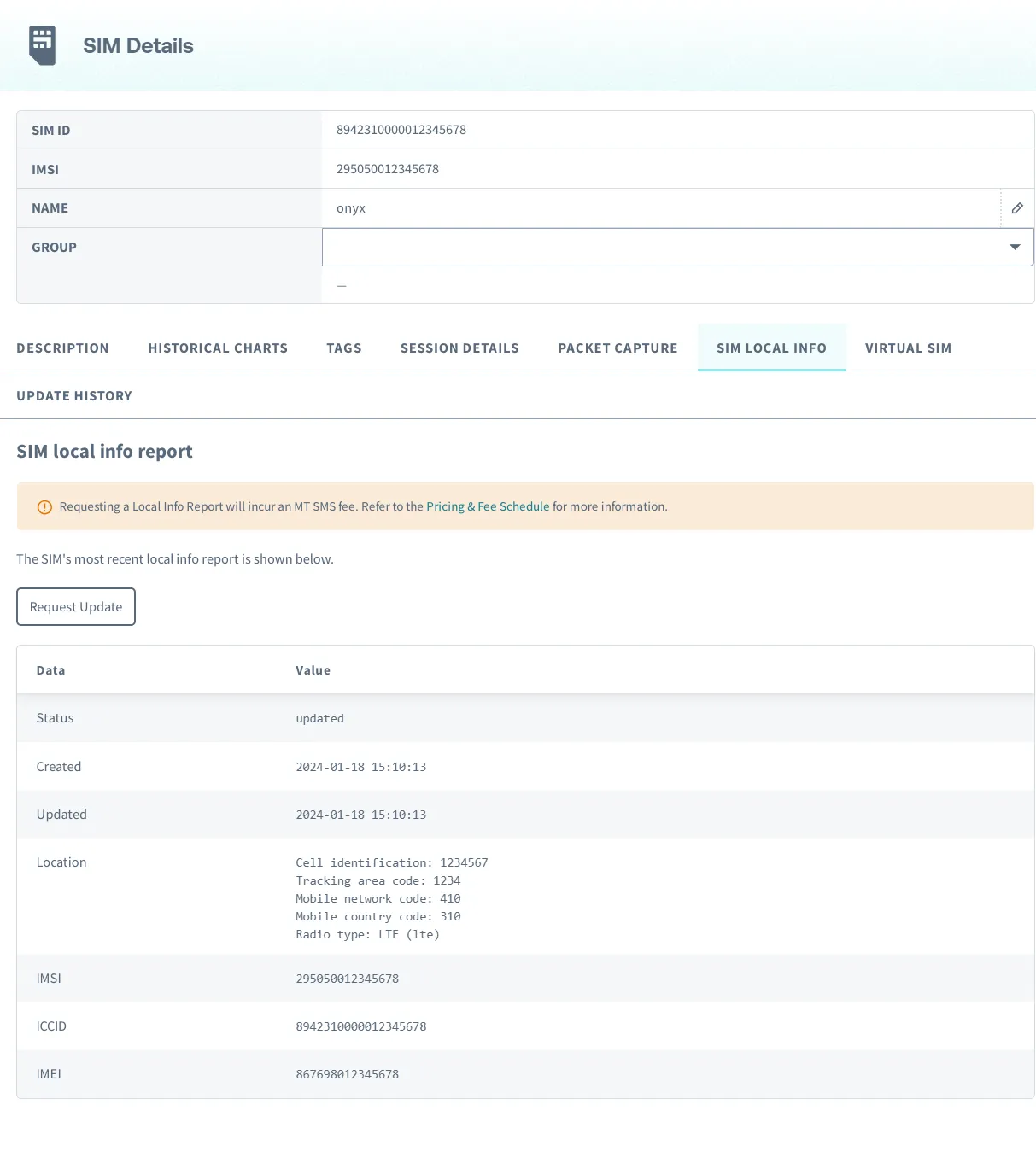
From the SIM Details dialog, click the SIM Local Info tab.
-
Click the Request Report button. A request will be sent to the SIM to execute the Local Info Report applet.
The Local Info Report may take up to a minute to generate. After generation, it will be sent to the User Console and will automatically appear once the data is received.
If the IoT SIM session is offline, a new Local Info Report cannot be requested. However, any previously retrieved report can still be viewed.
Programmatic Usage
You can also use the Soracom API, Soracom CLI, and Metadata Service to trigger a Local Info Report.
Soracom API
To access the Soracom API, first use the auth API to obtain an API Key and Token. Refer to the API Usage Guide for instructions on how to use the API Key and Token in API requests.
Then, use the reportSimLocalInfo API to request a Local Info Report from an IoT SIM:
curl -X POST \
|  -H 'X-Soracom-API-Key: <MY-API-KEY>' \
|  -H 'X-Soracom-Token: <MY-TOKEN>' \
|  https://g.api.soracom.io/v1/sims/<SIM-ID>/report_local_info
curl -X POST \
| -H 'X-Soracom-API-Key: <MY-API-KEY>' \
| -H 'X-Soracom-Token: <MY-TOKEN>' \
| https://jp.api.soracom.io/v1/sims/<SIM-ID>/report_local_infoIf the Local Info Report request is successful, you can then retrieve the report using the getSim API:
curl -X GET \
|  -H 'X-Soracom-API-Key: <MY-API-KEY>' \
|  -H 'X-Soracom-Token: <MY-TOKEN>' \
|  https://g.api.soracom.io/v1/sims/<SIM-ID>
curl -X GET \
| -H 'X-Soracom-API-Key: <MY-API-KEY>' \
| -H 'X-Soracom-Token: <MY-TOKEN>' \
| https://jp.api.soracom.io/v1/sims/<SIM-ID>The report will be included in the response as a localInfo attribute.
Soracom CLI
To use the Soracom CLI, you must first configure it to authenticate with your account information, authorization key, or SAM user credentials.
Then, run the following command to request a Local Info Report from an IoT SIM:
soracom sims report-local-info --sim-id <SIM-ID> --coverage-type gsoracom sims report-local-info --sim-id <SIM-ID> --coverage-type jpIf the Local Info Report request is successful, you can then retrieve the report using this command:
soracom sims get --sim-id <SIM-ID> --coverage-type gsoracom sims get --sim-id <SIM-ID> --coverage-type jpMetadata Service
The Metadata Service allows an Air SIM device to access and configure its own settings without the need for authentication. For more information, refer to the Metadata Service documentation.
Since an IoT SIM device should typically be able to access its own data locally, it's unlikely that you would need to use the Local Info Report function. However, as the Local Info Report API endpoint is within the /subscribers/<IMSI> API scope, you can still request a report if needed.
Use the reportLocalInfo API (via Metadata Service) to request a Local Info Report from an IoT SIM:
curl -X POST http://metadata.soracom.io/v1/subscriber/report_local_infoIf the Local Info Report request is successful, you can then retrieve the report using the getSubscriber API:
curl http://metadata.soracom.io/v1/subscriber